I accidentally made a pretty good iPhone speedometer
Last spring I bought an electric car, a Hyundai Ioniq 6, and it’s pretty good except for two things: the climate controls are a smooth, rigid touchscreen that can’t be used safely while driving, and the instrument cluster lacks a speedometer. Actually, it has two speedometers, each somehow less useful than the other. One of the bad speedometers is a blue blob that gets larger or smaller as your speed goes up and down, with no tick marks or scale to indicate how fast you’re going: it’s equally unhelpful in American and metric units. The other bad speedometer is a one-or-two-digit numerical display 1 that’s legible enough except that they placed it so that it’s obstructed by the steering wheel. It’s a weird miss in a car that’s otherwise really well executed.
Learning by doing it wrong
So the original plan was to get an ODB-II to serial adapter board from Sparkfun and then hack up something to render the speed as needle position on an analog potentiometer, just like a real speedometer from the first hundred years of automobiles.
As a first step I’d have the Pi just print the ODB-II port’s speed data. The key would be getting the speed out of it without getting distracted by all the other shiny things ODB-II is supposed to provide. (Note for car electronics enthusiasts: not even remotely interested in messing with the CAN bus directly. The risk/reward and effort/reward ratios for me are all wrong.)
I started with a Raspberry Pi Pico, since I was still goofing around
and wanted to figure the serial stuff out without having to rip a
whole Linux distro onto a regular Pi. I got the Sparkfun board and
soldered its rx and tx pins to the tx and rx pins,
respectively, on the Pico that corresponded to its UART0, while in
parallel figuring out what all of those words meant.2
I read that you can use screen as a serial terminal! (Yes, the
thing that I used before learning about tmux!) So the following
Saturday I did, and started sending to the Hyundai what appeared to be
ODB-II commands from my laptop via a Raspberry Pi Pico and the weird
Sparkfun ODB-II board. To my mild dismay, most of the ODB-II protocol
appears to be ignored by the car, possibly because there is no
combustion, internal nor otherwise, and no emissions to test. And one
can certainly understand how an engineer in Seoul or Ulsan, when
working through signal processing electronics design problems, might
reasonably have guessed that reporting speed out the Ioniq 6’s ODB-II
port wouldn’t be super useful: the port is supposed to be for
emissions compliance testing and fault detection which are both
activities typically done in a stationary car. I did manage to find
the VIN (encoded to look like a UUID instead of alphanumerics) and the
charge level on the car’s 77 kWh lithium battery (encoded as a byte,
which seemed reasonable enough). But the stupid car refused to give
the ODB-II port the speed.
I sat in the driver’s seat with my laptop and a bunch of crappy electronics draped everywhere, getting my head around the fact that seventy bucks and two Saturday afternoon’s worth of screwing around had netted me mostly just a bunch of stuff soldered pointlessly together. The most obvious thing to try next was pointing a little Raspberry Pi webcam at the two-digit speed indicator hiding behind the steering wheel and to OCR the digits into a number that I could convert to a voltage between 0 and 5V, which I’d run into the back of the potentiometer. Then I should be able to write (or etch?) markings on the potentiometer display glass indicating speeds between 0 and, say, 100 mph; and mount the thing to the top of the steering column with velcro and a hot glue gun, probably, so that it would be visible through the steering wheel. Or, like any other normal software person would have done to begin with, just take the OCR’ed speed and draw a picture of a speedometer on a tiny HDMI connected screen I’d picked up months earlier for…something. I could also have just displayed the digits that the camera saw but the point here was to have a good, glanceable speedometer, not to make one of the car’s bad speed indicators more visible.
Suppressing my annoyance at the amount of sunk time, I figured I’d at least get the display mocked up.
At night, after the second Saturday fighting with this stuff, I was poking around the internet for super simple graphics libraries (I don’t need a giant build chain or GPU support; just a framebuffer and one or two fps is enough for my speedometer, thanks), and I stumbled across fenster which seemed perfect for this project: cross-platform, low-level graphics that I could design on my laptop and then (presumably) just recompile to run on a Pi Zero. I could fuss over graphics in the evenings from the comfort of the couch, and then fight with the hardware (and the car) out in the driveway on the next nice non-workday.
My dad and I speculated that it would probably be possible to use my phone to display the speed that my GPS tracker app (another story, decades long) is already fetching (and displaying), but we dismissed it as a stupid idea since GPS measured speed is kind of jittery in the best of conditions and would be totally useless on big parts (especially the subterranean parts) of my urban commute.
Oh, that speed
Back in 2012 or so I wrote myself an iPhone app to replace my old school handheld Garmin unit for tracking everywhere that I ran, drove, or rode my bike. It showed maps and captured my location as reported by the iPhone’s built in Location Services API. Over the years it has gotten better or worse at its job as I paid more attention to it, or less attention, or as APIs I was using stopped working (looking at you, Dropbox), or as iOS completely changed languages and evolved incredibly fast over a decade and a half.3
I had noticed recently that sometimes the GPS points it app collected were registering an elevation of zero, even when latitude and longitude data had seemed pretty healthy. In fact, this had been happening a lot lately. I wondered whether it was because of Russian electronic warfare of the sort they’d deployed over Ukraine and the Baltic for the last year or two. Or maybe it was because my iPhone had recently been dropped 4 while I was on a run. Or someone at Apple decided that the Location Services API had grown tired of all the sweaty extra work of reporting elevation.
The other thing that happened since I first built my self-tracker app is that by now I have more maps around me than I know what to do with, and my own tracker app is really just there to collect GPS points, and it even tracks when backgrounded now, and so doesn’t really need to show me a map at all.
So I changed it to show me the current GPS-derived speed, which Location Services is kind enough to tell me, bumpy and noisy with high latency though it may be. I spent another week of spare time futzing around (there’s a thing called a Gauge now apparently) reading documentation and guessing what Apple’s programmers had in mind, and eventually I hacked up something that looks like the top half of a semicircle that renders speeds between 0 and 100 mph:
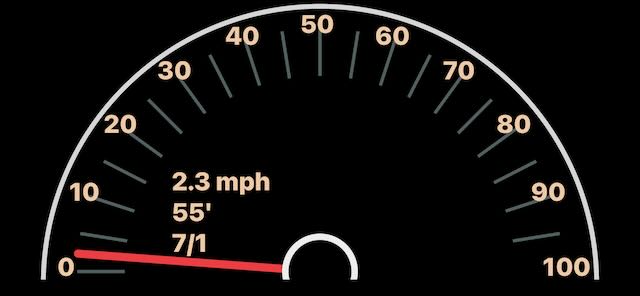
Walking around, the needle seemed to correspond to the speed that the device indicated (after re-remembering to convert to miles per hour from meters per second), and the elevation number seemed about right. Jittery like GPS data is, but about right.5
So I tested it out by driving somewhere, probably the store. After about fifty feet of driving the thing locked on to unreasonably precise speed updates and started showing me zero elevation. The speed exactly matched the speed reported by the bad digital readout on the car’s instrument panel.
Huh?
Actually reading the documentation, more
Well, it turns out that Location Services will, if one is available, simply believe a non-phone source of GPS coordinates. So if your phone is plugged into your car, and CarPlay permissions have been granted, and if your car has its own GPS unit and speedometer, then the phone’s Location Services API will give you information from the car instead of the phone’s own GPS chipset.
There are a lot of things wrong with this picture:
-
Why in the world must the car have a GPS unit in it to begin with? Especially when (if the user manual is to be believed) there’s no way to disable it! I unsubscribed from Bluelink, and have tried to modify my privacy settings on the Hyundai web site to revoke every permission I can, but somehow the GPS unit is still doing things. On whose behalf? It’s so, so awful.
-
How very annoying that Location Services doesn’t let me ignore the car’s notion of location! I can see why speed might be good to pull from the car. Speed is data that the car should very much have available all the time. But I want elevation. For my purposes I don’t even mind if it’s not end user configurable, but I’m the programmer here, and I want my elevation data! But at least now I understand the unaccountable zero elevation data: it happened whenever the phone was plugged into the car.
But one thing that’s really right:
- I now have a pretty good speedometer. It seems like it’s about half a second behind real time, but if I’m changing speeds hard enough for that to matter then I shouldn’t be looking at the instrument cluster anyway. It’s super visible and it looks like a normal round speedometer with a needle that points at numbers, and it’s glanceable: it isn’t hidden behind the steering wheel, and it doesn’t require extra attention while driving.
The phone’s/speedometer’s display autoadjusts to ambient light, so it doesn’t destroy my vision at night. (It calibrates its brightness more effectively even than the car’s own instrument cluster screen.) And the phone stays plugged in, so my phone always charges when I’m driving, and the app is always in the foreground which has the happy side effect of making it so that my GPS collector app (this same app) is also always in the iOS foreground doing its good work on my behalf.
Actual usage notes
It works great.
One more thing that’s totally wrong, though: I haven’t built a proper mount for it, so the phone just rests on the steering column. It’s the perfect position for a speedometer but because it’s only resting there it goes flying onto the floor if I turn much, or accelerate as one does.
When this happens I do pretty well at just letting it fall instead of reaching for the phone to try to catch it. It’s an instinct pretty well ingrained from childhood. At some point in junior high on what must have been a day off from school I was riding with my father to work, where he would spend the day dealing with big microscopes and image processing and students and stuff while I would use his lab’s very early Macintoshes and what turned out to be “the Internet” to download games and generate Mandelbrot fractals and stuff. On the drive down, Dad suddenly began to shout oaths and throw liquids; and this turned out to be what happens when one tries not to crash the car off the highway after having spilled boiling hot coffee on one’s lap. After things (and laps) had cooled off some, he said, “The trick is that if you’re driving and you start to spill coffee, the most important thing is that you’re still driving, so sometimes you have to just spill the coffee so you don’t die. Some people would try to catch the coffee instead, and they end up crashing their car.” Solid if accidental parenting.
I really ought to build a proper steering column phone mount.
Appendix
While waiting in line at the hardware store a month or two after writing this, I saw an eight-dollar iPhone steering column mount right there in the impulse buying section next to the registers at the local hardware store, beside the licorice and the gum and whatnot. I bought it and installed it in thirty seconds in the parking lot (by peeling off the protective plastic and sticking the mount to the steering column). The phone attaches magnetically with just the right strength with no added hardware. Tadaa!
-
I’m using miles per hour as Ben Franklin himself presumably intended. If I were using metric units like god wants then I’d probably see three digits most days, but probably never 162 km/h. ↩︎
-
The fact that I could learn this by just kind of doing it and reading things is why normal nerds use Raspberry Pi stuff instead of the probably ten times more capable off brand hardware that real nerds already know how to use: RPi stuff is all pretty well documented, so you can show up to a project like this and be pretty confident that even though you’re a mouth breathing data engineer, whatever that means, and an ex-Java programmer, and never even studied computer science, you can still do microprocessor stuff and touch hardware without letting the blue smoke out of everything in sight including your new car that cost dozens of thousands of dollars and might burn for days with lithium vigor with you in it if you messed things up hard enough. Documentation for the win. ↩︎
-
There’s another long form essay somewhere around here about my personal two-decade GPS dataset and all the work I’ve sunk into it over the years. It’s been pretty fun, but I find too often that I jump down this narrative rabbit hole until people start walking away from me uneasily. So for now it’s just this paragraph, and this footnote. ↩︎
-
I’m an educated man and I know about the passive voice. ↩︎
-
Do not be mistaken: I’m a recovering physicist, and I deeply appreciate that GPS is awesome, beautiful magic; one of the things that makes me glad to be alive now. How can it possibly work even one percent as well as it does? Handheld, practically disposable units talk to atomic clocks on satellites zipping around in space and interpret the radio signals they receive accounting for things like refraction through the ionosphere and general relativity. In your pocket. From orbit. If only the clocks weren’t so far away from the wheels of the car… ↩︎