September 2026 AI usage notes
Claude Code remains a pretty nice harness and I still use it at work, although its inner workings are more opaque even than they used to be, which doesn’t seem like a great long term situation. I’ve been using pi for a lot of my non-work work, but for now Claude Code is still in heavy rotation: the trillions of dollars worth of GPU farms make it go fast (most of the time), and because of that speed I manage more often to stumble across nice usage patterns. And the usage patterns translate pretty well to self-hosted harnesses. Here are a few.
Let’s collaborate on this prose
A problem I often see in my Claude Code driven Python code is that its documentation (and sometimes the code) looks like it was written by an LLM whose first language isn’t English, full of “honest tradeoffs” that “pay” or that “bite”, maximally ambiguous present tense verb conjugation, and other such crap that I don’t want to foist on my human colleagues or friends because I have some self respect and because they deserve to have an easy time interpreting what they read. In such situations the easy trap to fall into is to stay in the terminal and ask Claude to fix things one sentence at a time.
The better solution would be to edit the file and have it perceive what you’re doing and respond accordingly. Happily, the models are smart enough now that you can just describe the process you want, and it starts doing it! Here’s (roughly) what I wrote:
I have a better idea for how to collaborate: let’s start by you writing that document to a file, maybe
/tmp/prose.md, and I’ll make edits to that file in place. As I save those edits, you watch for the changes to the update timestamp on the file and read my changes, and respond to them either by making more edits or by answering the questions I ask you or just by providing me feedback on what I just wrote: whether I’m missing key details, leaving things either more or less clear than before, etc.
It responded by kicking off a background task that watched that file for changes, and then I could act as both author and editor with Claude playing the other role, making changes and adding questions inline (like “[[question: did this code used to have a problem, does in have a problem after this change, or will it have that problem in some future world if future collaborators aren’t careful? please either clarify or ask for more context]]”), just by editing the file like a normal person. (It figured out without further explanation that questions I put in brackets were things it should read and answer; and that when I repaired a sentence or two, those were my edits that I thought were improvements and that it should evaluate them rather than overwrite them.) It updated the document out from under me in my text editor, exactly how I wanted. I could watch the edits appear a couple lines at a time with maybe a second or two of latency. It’s the low latency that causes this to feel like useful magic (rather than a promising but useless magic trick). It’s a much, much nicer user experience than back and forth telling the chatbot how to edit the text; and much nicer than writing a bunch of text and pasting it in for review.
The cycle time was a few seconds at most, about the same speed as being in conversation with a person, except that I got to type exactly what I meant. Technical prose turns out to be much easier (for me) to write freely when you have a robot editor bearing a couple dozen tricky assertions and caveats in mind, instantly checking your every utterance (well, your every utterance after you hit “Save” in the editor). It’s a lot like editing code that’s backed by unit tests: you can freely rip things up and glue them back differently with the confidence that if the tests all pass then you probably aren’t breaking anything.
Eventually I thought our prose was non-embarrassing and I said so, in the CC terminal interface, at which point it shut down the monitoring loop and integrated the repaired text back into the code we were working on. There had been basically nothing to configure, and there was nothing to tear down. It was just left for me to remember this rather great pattern of working with coding agents, which is why I’m writing it here for my future self.
Add this little feature for me
I have a bunch of little utilities running in various parts of my personal computing estate, like the hand rolled blogging software that gets these words in front of you and the GPS tracking speedometer and RedScreen and pi and ds4 and a bunch of other things, and pretty often something small is missing that I can just plain old fix now because I have the source code to all of them. I suppose I could always have tweaked all my software, but not with the brain I have and my desire to ever do anything else in my life besides futz with the computer. The models are good enough that I can add stuff for very, very cheap; and the risk is low, since if something breaks I just revert and it didn’t really cost me any (human) time, just a tiny bit of electricity. Recent examples: n
- A massively improved graphical preferences pane for ghostty, my terminal app, to replace its built in “edit a text file and cross your fingers” method
- A menubar item for ds4 so that I can tell at a glance whether it’s already running (and quit it from the menubar without trolling through my terminal windows) so I don’t crash the laptop by overflowing the computer’s really enormous amount of RAM by, say, launching another memory-hungry LLM
- A cache visualizer for ds4 so I can tell whether I’m filling my laptop’s disk too fast, which I was, so I also put together…
- A delta format rewrite of the ds4 kv cache so it uses disk space linearly in conversation size rather than quadratically (and caches intermediates way better, so everything is faster)
- Timestamps everywhere in ds4-agent and pi
- Background tasks and subagents in pi (not sure this is useful, but it’s neat to watch)
- Ingest Garmin GPS files “the same way” as the formats I’ve been hand crafting over the years (I still almost can’t believe this was a one-shot fix)
- Half a dozen similar utilities for work stuff, mostly involving the
ghcli for github - “Read this github issue and prototype a fix” works surprisingly well for sufficiently well scoped tickets
- “Make the React UI look more like this Figma prototype” works astonishingly well, so well that I can use it occasionally at work
This is half a step closer to the open source dream: everyone can modify their code to meet their needs (great!) and will have the wherewithal and patience to do so (well, half a step closer is better than none, I guess).
Keep track of all these little git checkouts
One always ends up with piles of little git commits when working with coding agents this way to keep track of changes to the code. It’s much, much harder than managing code changes yourself (except that people who /really/ like git tend not to mind; I’m not one of them). Mercifully, the coding agents are also really good at keeping track of twisty trees of overlapping changesets, and as if by magic they can be instructed in English to move sets of changes around, and in particular to reconcile all these changes with new changes from upstream (all overlapping, of course) where the open source project maintainer or the work colleague has pushed code changes that you now must inject into the (local) git tree “before” all the changes you have locally.
I won’t show the stuff from work, obviously, but here’s some examples from the above list of “local little features” and how they translate to local commits that I need to keep rebasing. (To “rebase” here means to pull the changes from upstream and then rejigger my local commits so that they 1. look reasonably like they got made atop these newly pulled changes even though they got made against a previous version of the code some weeks or months ago, and 2. make everything “work right” in the face of those overlapping, conflicting changes from upstream, which sometimes can be repaired mechanically and automatically by the LLM and sometimes require actual thought from me about what to do when things aren’t easy and automatic, or when there’s a genuine semantic conflict to resolve. I can’t emphasize enough to my non-programmer friends how much of a pain in the ass this can be when done by hand; and it is often still painful with robot assistance, but at least the pain is now limited to actually answering the questions about how to resolve the hardest 5% of conflicts rather than dragging oneself through dozens of minutes of busywork multiple times a day. (There’s obviously an xkcd about this from the before times.)
de1b684 agent: keep speculative block tails to preserve the KV checkpoint (Josh D, 23 hours ago)f0ea8b0 linenoise: add Emacs word motion and a kill ring (Josh D, 6 days ago)5f49c09 agent: add /resume as an alias for /switch (Josh D, 6 days ago)ee1138a Store KV checkpoints as delta records instead of full snapshots (Josh D, 8 days ago)58be3c3 server: add a /kv treemap dashboard for the disk KV cache (Josh D, 10 days ago)00f356d ngram prompt-lookup drafter (--ngram-draft): suffix-array based alternative to MTP/DSpark/GLM (Josh D, 3 weeks ago)c63338c server: add --log-accept to report accepted speculative tokens per decode chunk (Josh D, 3 weeks ago)c40ccdd menubar: implement real fork+exec spawn with DS4_NO_MENUBAR opt-out (Josh D, 3 months ago)3f349ca menubar: add info row and Quit action that SIGTERMs the parent (Josh D, 3 months ago)d4ae12b menubar: terminate if kqueue() itself fails (Josh D, 3 months ago)9160f5a menubar: exit when parent dies via kqueue NOTE_EXIT (Josh D, 3 months ago)ffa4808 menubar: include ds4-menubar in make clean (Josh D, 3 months ago)825c931 menubar: add ds4-menubar helper binary with status item (Josh D, 3 months ago)a5bdf96 menubar: link spawn stub into cpu: targets too (Josh D, 3 months ago)3edfd03 menubar: add no-op spawn stub and wire to all ds4 binaries (Josh D, 3 months ago)cacec3e Add menubar indicator implementation plan (Josh D, 3 months ago)a4b1381 Add menubar indicator design doc (Josh D, 3 months ago)c0a6119 Preserve the final byte of in-memory session snapshots (Salvatore Sanfilippo, 28 hours ago)49ec955 Keep ROCm QA builds clean for partial tiles and CPU-only fixtures (Salvatore Sanfilippo, 28 hours ago)d12898f Initialize the terminal escape buffer for GCC dataflow checks (Salvatore Sanfilippo, 28 hours ago)78c522e Keep DSpark EOS fixture compatible with pre-fix source (Salvatore Sanfilippo, 28 hours ago)5ad935d Merge PR #996: validate saved quality scores and frontier logits (Salvatore Sanfilippo, 28 hours ago)…
So there’s the aforementioned menubar addition in there, and some experiments with a multi-token predictor algorithm, and some keybinding stuff, and the delta cache format, and some other stuff all done “more recently” (except that some of it was months ago) than the changes of record bestowed on us by antirez the other day. No way in the world I could keep rebasing this successfully myself day after day; or maybe I should say, I just wouldn’t bother.
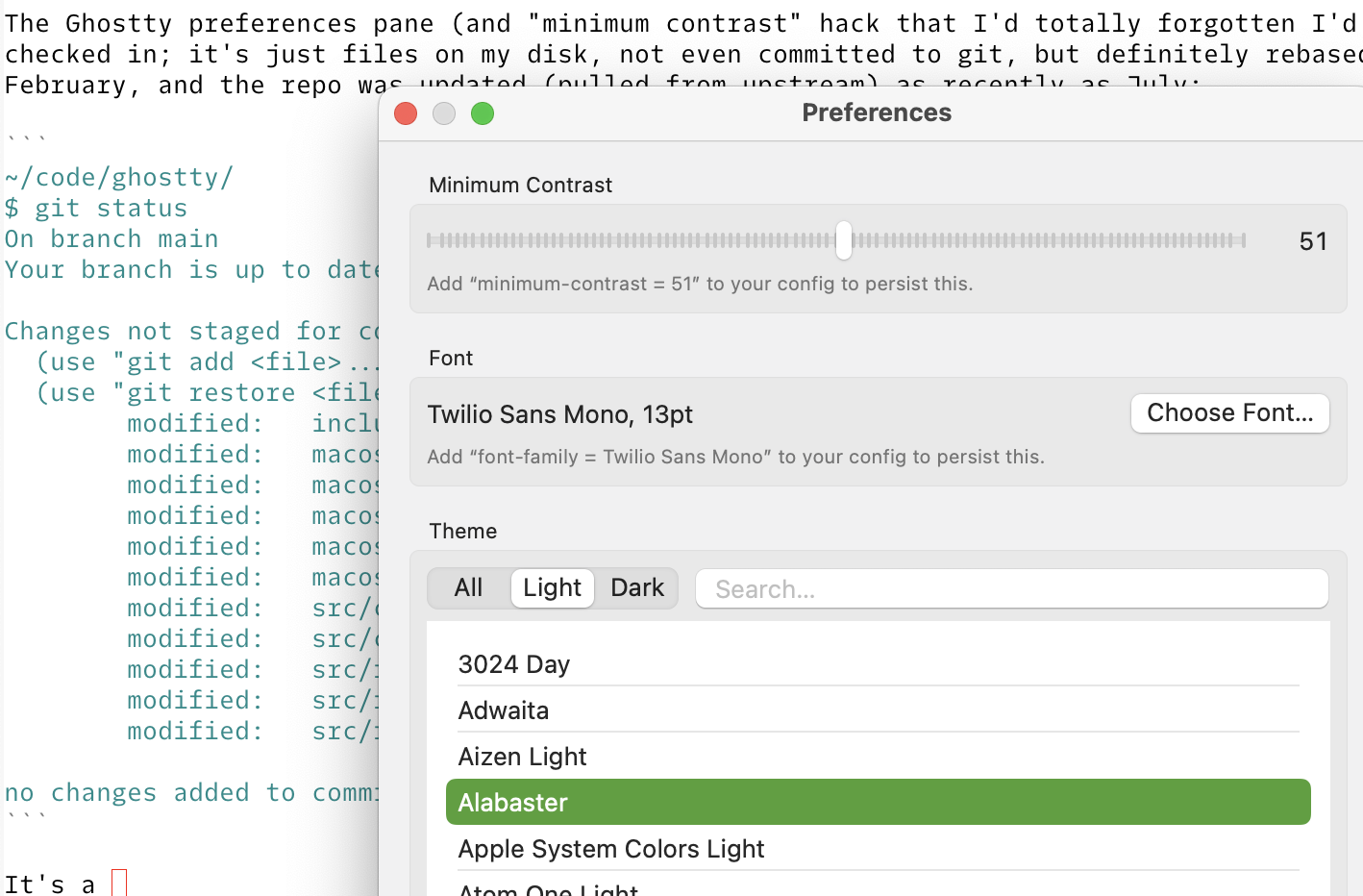
The Ghostty preferences pane (and “minimum contrast” hack that I’d totally forgotten I’d written and was happily using!) isn’t even checked into my copy of the ghostty code; it’s just files changed on my disk, not even committed to git but definitely rebased for at least a few months. I think I wrote this in February, and the repo was updated (pulled from upstream) as recently as July. Again, without an automatic machine to do most of the rebasing work I’d still be either using a February vintage version (a bad idea given the state of cybersecurity, what with all these AI agents out there doing things) or I’d have just dropped my feature on the floor.
It’s a strictly funner world for me.
Do this locally without the internet
There are useful things you can do with a local model, even if you have a less beefy machine than this: they’ll tell you the exact syntax for git commands and other CLI tools; the nuances of any programming language, translated from your English (or whatever human language; they all work); decent advice about why your computer is behaving in some unexpected way (whether programming or just being a normal person who uses computers for stuff, even/especially trivial stuff like watching TV or reading email); how to get your blogging software to work properly when it worked just fine the other day; or anything you don’t feel like broadcasting to the whole damn internet via Claude Code not because you have anything to hide but because you don’t feel like it should cost you $20/month to ask basic questions or require you to let ChatGPT save a copy of all your personal questions forever.
One could use the big models like Claude Code for this, but I don’t like the idea of having to rent LLM access. And it’s not free, for sure. Neither was my fancy new laptop, but I’m old and I had some savings so I bought an M5 Max 128 GB laptop and now I can run things like Deepseek v4 Flash and Qwen 3.8 Flash Next which have hundreds of billions of parameters (good lord) and can run at tolerable speeds right here on the laptop. They’re more or less like Sonnet/Terra, but slower. When running an LLM, the otherwise silent fans make a remarkable amount of noise and the computer becomes too uncomfortably hot to be used on a lap. (And this is the energy efficient version of running an LLM! Datacenters full of Nvidia cards or whatever use something like three times as much electricity, and constantly.) But Claude Code really likes to be able to talk to Anthropic servers, so one instead uses something like OpenCode or Pi. I use Pi or ds4-agent, since they’re both simple enough that I can (mostly) reason about how they’re behaving and disconnected enough that I don’t mind running them.
Have them summarize things and quiz you
Tell your agent harness (or just tell Claude or ChatGPT in the chat interface) to summarize a codebase/topic/whatever for you, explaining things hierarchically, and presenting the whole thing as an interactive HTML page. They’re shockingly good at this. You can even wave your hands at the part of things you need the most help learning. You can even ask it clarifying questions about the stuff you don’t get. Tell it also to compose a five-or-ten-question multiple choice quiz at the end, for you to test your own understanding. (Tell it using English words similar to those.) I use this one at work all the time to ensure that I have accurately understood all the things I think I know about a codebase, and I often learn that I’m missing important subtleties. The kids are all heavy AI skeptics, all scarred by years of watching one or probably way more than one of their classmates use ChatGPT mostly to cheat); but the kids tell me this is a good study tool for school generally.
Break them
But the best thing to do with local models is to watch them fail. This works with a model of any size. When you see an LLM just barely fail at a task then you start to learn what AI failure modes look like and you start to become able to spot the onset of imminent failures in the big models, even the frontier models like Fable and Sol that you pay a lot of money for. The dumbest/smallest models are easily stumped into either perseverating or obviously making stuff up, or in extreme cases emitting random Chinese and Cyrillic characters
Being honest: I've had you treating it as a smoking gun and it's a testable step about attention-sentence selection — my process; synrai _eval_plus)/hostpp son anteburn I led with brain irrelevant but said nothing about HT is minutesdoor ג三星.
…and right before they start doing that, they show signs of failure like subtly losing their train of thought or forgetting who’s speaking. Bigger, more useful models in the low tens of billions of parameters kind of do the same thing, but more slowly and less obviously: they perseverate, they get confused about what you’ve said and what they’ve thought, they think only half carefully, and so on. The giant models kind of do the same thing, but you have to keep your eye on them because they’re so big and smart that if you’re not paying attention they’ll trick you into thinking they always know what they’re talking about, and it’s easy to be fooled because they’re right about a lot (in some domains).
Next to actually knowing how to write (so you can perceive AI slop for what it is), one of the more useful skills with these things is knowing what a failing model acts like. It’s good both for removing right amount of magic from your mental model of what these things are doing, and also for becoming better at reasoning yourself, and for becoming a savvier user of AI models. Figuring out how to simplify your problem so that an AI model can tackle it cleanly, or so that a much cheaper and smaller model can do it faster, or locally and therefore more privately, feels to me like one of the more important new skills folks should be trying to pick up.
It’s also fun. Aren’t you having fun?
Bonus
multi-provension that sequence approaches kill low harus early. Owing us a tic baisbie's under forecasting (now contiguous dis is unfinalizeth = __~~筆>, < 7-Jul周刊兾相한
Obviously.