Annals of data quality, Volume I
One of the problems with wanting to have fun while tracking the fun with your hand rolled GPS tracker app is that sometimes the layers of magic stop working and it makes the fun less fun. I skied Mount Sunapee the other day, and of course the app had a problem right in the middle of three hours of pretty hard, fast turns. It was like forty degrees and intermittently sunny, and the (surprisingly decent) machine made snow was mostly not icy. At one point I even managed to approximate some carved hip drop turns. It was midweek skiing, one of the sabbatical’s singular virtues, and there were no lines so Eric and I basically skied our faces off for three straight hours. Which was plenty for me. Legs and back used up nicely.
But of course the experience bore the stupid tinge of frustration that half-terrible GPS tracks always bring.
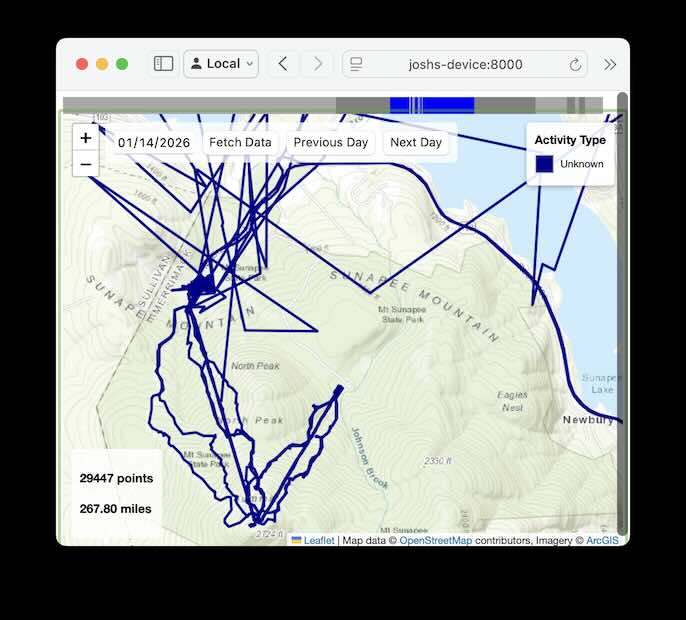
About half of the Mount Sunapee part of this map is obvious garbage, like the phone forgot how to listen to outer space for the first three or four runs, there, and instead tried to triangulate distant cell towers from weird elevations, because, hey, iOS needs that hardware for something else. Or something. The driving part of the tracks were fine, as they always are these days thanks to the hand rolled CarPlay-connected speedometer. My working theory is that this CarPlay business is related to the failure: some combination of charging and unplugging and stopping to use a men’s room and using other apps on the phone and…something. Maybe the phone-based lift ticket app caused a weird force quit, or Location Services part of iOS just got confused with all the cars and Epic apps and stuff. If I recall correctly, upon noticing the app in a bad state I ended up fully rebooting the phone to fix it. Frustrating.
The tracking is pretty reliable when plugged in, and it’s pretty reliable when not plugged in. Just going back and forth messes everything up, as iOS Location Services decides to get speed measurements from the car itself (good for speedometers apps!) and then has trouble rediscovering its GPS hardware upon unplugging. I’ll have to debug it more, someday, when I’m not havin as much fun.
Data quality lessons:
- You have to look at the data to learn whether it’s any good.
- Bugs in the field are weird. iPhones and the field are complex places.
- And if it’s a personal, one-user app then live telemetry doesn’t help; you just have to notice the problem as it’s happening in the field.
- Don’t forget that the Global Positioning System is so incredibly magical that it shouldn’t work at all. Way too much impossibly difficult physics. Be grateful for what data we have.